


Before you buy call-center software or recruit agents, define the work they will do. Who will call, what help will they need, and who can resolve the request? Those answers give you a basis for planning shifts, choosing systems, and preparing a budget.
This guide is for businesses setting up a sales or service operation, including a small team. You can use the same planning process to establish an outsourced call-center business, but you will also need to define the service you sell and your responsibilities toward each client.
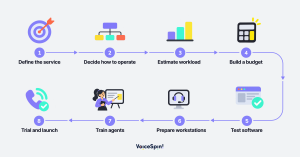
1. Define the service and the result you want
Write down which enquiries the team will handle and where an agent’s authority ends. A team checking delivery status needs different information and permissions from a team selling subscriptions. Specify opening hours, service languages and how agents pass cases to another department.
Choose measures that reflect the purpose of the operation. In service, you might track whether customers receive a resolution without calling again. In sales, you might track appointments that actually take place or completed deals. Also check waiting time and calls abandoned before an answer. Set initial targets, then review them against actual operating data.
2. Decide how you will operate the team
For incoming calls, plan the queue and the route to the right person. For outgoing calls, define who agents should contact, the purpose of the call and how they record its outcome. If agents do both, decide who answers incoming calls during busy periods and when the team pauses outgoing work.
Decide who manages and employs the agents: your business or an outside operator. Separately, choose whether they work from an office, remotely or in a combination of both. With cloud software, you still need to arrange workstations, connectivity, training and day-to-day management. Confirm each party’s responsibilities in writing.
3. Estimate workload before deciding how many people to recruit
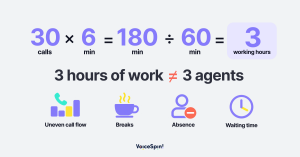
If you already have call records, group them into half-hour periods and check how many calls arrive and how long handling takes. Include the time agents spend documenting and completing work after the call. For a new operation, state your assumptions and revise them after a limited trial.
For illustration only: 30 calls in an hour, with an average handling time of six minutes each, amount to 180 minutes of work. Dividing by 60 gives the equivalent of three uninterrupted working hours within that hour. You cannot conclude that three agents will be enough. You still need to account for uneven call arrivals, breaks, absence and the waiting time you are willing to allow.
Ask whoever plans the shifts to calculate staffing against those conditions. Schedule time for training and coaching as well. Before opening, name the person agents can turn to when a customer needs a decision beyond their authority.
4. Build a budget you can compare with supplier quotes
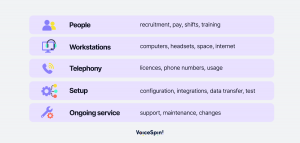
Separate setup expenses from ongoing costs. For each item, record the quantity, charging unit, person responsible and what the quote excludes. Ask suppliers to price the same operating scenario so you can compare the total cost under the same assumptions.
Include these items in your budget worksheet:
- People: recruitment, pay, shift management and training.
- Workstations: computers, headsets, workspace and connectivity.
- Telephony: software licences, phone numbers and usage charges.
- Setup work: configuration, system connections, data transfer and acceptance tests.
- Ongoing service: support, maintenance and changes after launch.
Check how the price changes when you add users, increase call volume or need more storage. Ask about minimum commitments and exporting your data when the contract ends. Get a separate estimate for work the supplier prices outside the package.
5. Choose software by testing your own scenarios
Bring examples of the work you expect to a demonstration. Ask the supplier to show what happens when a customer selects an option in the voice menu, reaches a busy queue, transfers to another department and calls outside opening hours. Check the route for a customer who does not select an option as well.
If you use a customer relationship management (CRM) system, test what the agent can see when answering, where they document the call and how the connection handles a failed update. In the integration directory you can begin checking the connection relevant to your business. Confirm compatibility, implementation scope and cost with the supplier.
For outgoing calls, demonstrate the flow from selecting a contact to recording the outcome and arranging follow-up. For reporting, ask the supplier to retrieve a specific call and show how it appears in the report. Write down which tests passed and which require further work before you choose.
6. Prepare the workstations and access permissions
Test calls using the computers, headsets and network connection agents will actually use, including during busy periods. Ask the supplier for its network and device requirements, and have your technical team check them. For remote staff, include home workstations in the tests and agree what agents should do if their connection fails.
Define who may view customer details, listen to recordings and export information. Assign responsibility for approving access and removing it when an employee leaves. Before enabling recording or transcription, have the responsible people in your business agree the purpose, access permissions and retention policy.
7. Train agents on a complete customer interaction
Give agents an opening script, current answers to common questions and instructions for handling exceptions. Practise a customer interaction through to completion, including documenting it and carrying out any promised follow-up. Ask agents to explain what they will do when they do not know the answer.
In the first shifts, make sure a team lead is available for questions. Set aside time to review difficult interactions and update the instructions. Check that agents can take breaks without leaving the queue unattended, and give them a clear route for reporting recurring problems.
8. Start with a limited trial and check readiness for launch
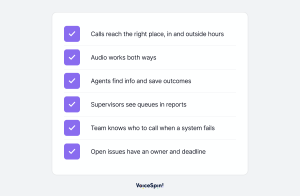
Choose a defined group of agents and a limited scope of work for the trial. Assign someone to follow each problem through to resolution. Before expanding activity, check the following with the team:
- Customers reach the right destination during and outside opening hours.
- Agents can hear customers and customers can hear agents.
- Agents find the information they need and save the outcome of the interaction.
- Supervisors see queues and calls in the reports you agreed on.
- The team knows whom to contact when a system fails.
- Managers have assigned an owner and a deadline to unresolved problems.
Decide in advance which failures would prevent you from opening. A wrong destination, missing customer information or an unreliable connection may require a fix before expansion. Have the operations manager and the technical lead review readiness together.
Keep measuring after the first shift
Review results by time period and type of enquiry. Check average handling time alongside resolution of the enquiry, repeat contacts and the quality of the team’s responses. Use what you find to adjust shifts, training and work instructions.
Consider automation for a defined task, such as preparing a draft call summary for an agent to check. Before adding it, decide who checks errors and when a person must take over. Test it against examples of your work and confirm the supplier’s language support and limitations.
To see an example of implementation in an existing operation, read how Carrefour Israel uses VoiceSpin’s cloud telephony in its customer-service and support departments. Use the example to prepare questions for your own project, and confirm its scope separately with the supplier.
You can also read the interview about technology choices when setting up a call center. To discuss your planned operation, arrange a demonstration with VoiceSpin and ask to test the scenarios you have defined.



 +18889082995
 +442036084160
 +97237237006
 Call on WhatsApp

